

How to File ITR Online India: 5 Proven Steps to File Without Costly Mistakes
It is mid-July. You are sipping a ₹20 chai at your office desk, and your WhatsApp group chat is buzzing with panic. The topic? Income Tax Returns (ITR). Everyone is talking about Form 16, Deductions, and the dreaded July 31st deadline. If you are a first-time earner, this whole process probably feels like trying to read a foreign language. You might even be tempted to pay a random local agent ₹1,500 to do it for you.
Do not do that. Paying someone else to do something you can easily manage in twenty minutes is a waste of your hard-earned money. The truth is, learning how to file ITR online India is incredibly straightforward once you understand the basic moving parts. You do not need a degree in finance to get this right.
This guide is designed specifically for salaried professionals and first-time taxpayers in India. We will strip away the confusing jargon, break down the math, and walk you through the entire process step-by-step. By learning how to file ITR online India, you will know exactly how to handle your tax filing independently, securely, and without any stress.

Key Takeaways
- Filing your taxes online is completely free and takes less than 30 minutes if you have your documents ready.
- Understanding how to file ITR online India helps you claim your tax refunds directly into your bank account.
- You must choose between the Old Tax Regime and the New Tax Regime before you start the filing process.
- Key documents like Form 16, Form 26AS, and your Annual Information Statement (AIS) are essential for error-free filing.
- Failing to verify your ITR within the mandated 30-day window will make your entire tax filing invalid.
Step 1: Gather Your Tax Documents Before You Begin
Before you even log into the official Income Tax e-filing portal, you need to collect your financial paperwork. Trying to search for documents mid-way through the filing process is a recipe for errors. Let us look at a real scenario to understand why this matters.
Meet Rohan, a junior software developer in Bengaluru who earns ₹55,000 per month. Last year, Rohan tried to file his taxes at 11:30 PM on July 31st. He did not know how to file ITR online India properly, did not have his documents ready, guessed his interest income, and ended up receiving an error notice from the Income Tax Department. To avoid Rohan’s panic, make sure you have these three documents downloaded on your laptop:
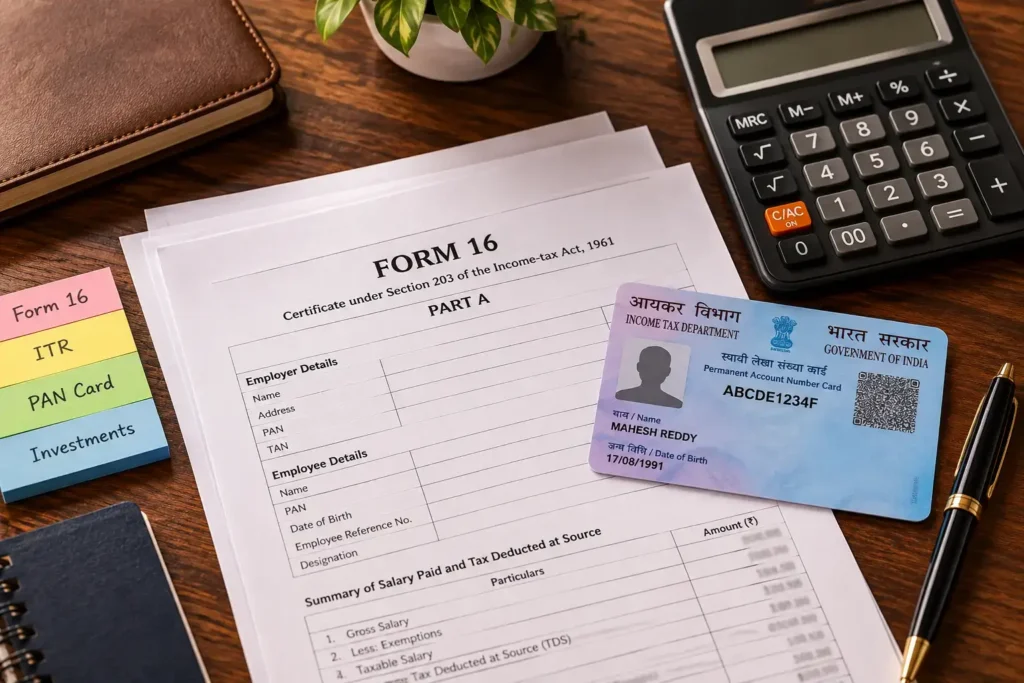
1. Form 16 (Your Salary TDS Certificate)
This is the holy grail of documents for salaried employees. Your employer is legally required to provide this to you by mid-June. Form 16 is divided into two parts: Part A shows how much Tax Deducted at Source (TDS) your company cut from your monthly pay and deposited with the government. Part B shows your total salary breakdown, allowances, and tax exemptions. If you have changed jobs during the financial year, you must collect a Form 16 from both employers.
2. AIS and TIS (Your Financial Footprint)
The Annual Information Statement (AIS) and Taxpayer Information Summary (TIS) are comprehensive digital ledgers maintained by the government. They track almost every major financial transaction linked to your PAN card. This includes the interest you earned on your savings account, fixed deposits (FDs), stock market transactions, and mutual fund redemptions. You can download these directly from the e-filing portal. Knowing how to file ITR online India means understanding that the income tax department uses this data to cross-check your tax return, so your manual entries must match these numbers perfectly.
3. Form 26AS (Your Tax Ledger)
Think of Form 26AS as your tax passbook. It displays all the tax deposited against your PAN card throughout the financial year. This includes TDS deducted by your employer, TDS on bank FD interest, and any advance tax you might have paid yourself. Always verify that the TDS shown in your Form 16 matches the TDS reflected in your Form 26AS. If there is a mismatch, you need to contact your employer’s HR department immediately to correct the error.
Step 2: Choose the Right Tax Regime and ITR Form
One of the biggest hurdles when learning how to file ITR online India is deciding how you want your income to be taxed. India currently has two parallel tax systems. Making the wrong choice can cost you thousands of rupees in unnecessary taxes.
| Feature | Old Tax Regime | New Tax Regime (Default) |
|---|---|---|
| Tax Slabs | Higher tax rates on lower income slabs | Lower, simplified tax rates |
| Exemptions & Deductions | Allows HRA, LTA, Section 80C, 80D, etc. | Most deductions are removed |
| Standard Deduction | ₹50,000 (standard for salaried) | ₹75,000 (increased recently) |
| Best Suited For | People with heavy investments in ELSS, PPF, Insurance | People who prefer simple filing with zero investments |
If you do not actively invest in tax-saving instruments under Section 80C (like Public Provident Fund or Equity Linked Savings Schemes), the New Tax Regime is usually the most beneficial option. In fact, the New Tax Regime is now the default option on the portal. If you want to use the Old Tax Regime to claim deductions, you must explicitly opt into it during the filing process.
Understanding Which ITR Form Applies to You
The Income Tax Department has different forms based on your sources of income. Using the wrong form will result in your return being classified as defective, forcing you to file it all over again. For most beginners, the choice is simple:
- ITR-1 (Sahaj): For individuals who earn income from salary, one house property, and other sources like savings bank interest (up to a total income of ₹50 Lakhs).
- ITR-2: For individuals who have capital gains from selling stocks, mutual funds, or real estate, or those who own multiple house properties.
- ITR-3 / ITR-4: Used by freelancers, business owners, and professionals who have business income.
If you are a regular salaried employee who only earns a monthly paycheck and bank interest, ITR-1 is your go-to form. If you sold mutual funds or stocks during the year, you will need to file ITR-2.
Step 3: The Step-by-Step Guide on How to File ITR Online India
Now that you have your documents ready and know your form, let us walk through the actual online portal. Open your browser and navigate to the official Income Tax e-filing portal (incometax.gov.in).
Registering and Logging In
If you are a first-time filer, click on the ‘Register’ button in the top-right corner. Your Permanent Account Number (PAN) will serve as your unique User ID. Enter your basic details, verify your mobile number and email ID using One-Time Passwords (OTPs), and set a strong password. Once registered, log in using your PAN and password.
Initiating the Filing Process
Once you land on the dashboard, follow these simple steps:
- Click on ‘e-File’ > ‘Income Tax Returns’ > ‘File Income Tax Return’.
- Select the relevant Assessment Year (AY). Remember, if you are filing taxes for income earned between April 1, 2025, and March 31, 2026, the Assessment Year is AY 2026-27.
- Select your filing mode as ‘Online’ and click ‘Start New Filing’.
- Choose your status as ‘Individual’.
- The portal will ask you to select your ITR form. If you are unsure, the portal can guide you through a brief questionnaire to select the correct form automatically.
Verifying Pre-Filled Data
The modern e-filing portal is highly automated. It pulls data directly from your Form 16, AIS, and bank records to pre-fill most of the sections. Your job is to carefully verify each of these five schedules:
- Personal Information: Double-check your name, address, contact details, and bank account information. Ensure your primary bank account is validated so you can receive your tax refund directly.
- Gross Total Income: Verify your salary income matches your Form 16. Don’t forget to manually add any other income, such as interest earned on your savings account or fixed deposits.
- Total Deductions: If you are using the Old Tax Regime, confirm your deductions under Section 80C (PPF, LIC, ELSS), Section 80D (health insurance premiums), and Section 24(b) (home loan interest). If you are using a Home Loan EMI Calculator India: 7 Proven Checks Before You Borrow to plan your finances, this is where your home loan interest tax benefits will be claimed.
- Tax Paid: This section shows the total TDS already deducted from your income. Ensure this matches your Form 26AS.
- Total Tax Liability: The portal will automatically calculate your final tax liability based on the data provided. If your tax paid exceeds your tax liability, you will see a refund amount. If you owe money, you must pay the outstanding tax online before submitting.
Step 4: Avoid Common Tax Filing Mistakes
Even with pre-filled data, thousands of Indian taxpayers make simple errors that result in tax notices or delayed refunds. Knowing how to file ITR online India correctly means being aware of these common pitfalls.
1. Forgetting to Declare Bank Interest
Many beginners assume that because their savings bank interest is small, they do not need to report it. This is a massive mistake. The Income Tax Department receives automatic reports from your banks. If you earn interest on your savings account or fixed deposits, you must declare it under ‘Income from Other Sources’. Under Section 80TTA, you can claim a deduction of up to ₹10,000 on savings account interest under the Old Tax Regime.
2. Not Validating Your Bank Account
If you are eligible for a tax refund, the department cannot send it to you unless your bank account is pre-validated on the e-filing portal. Log into your profile, navigate to ‘My Bank Accounts’, and ensure your preferred account is validated and nominated for refund. The name on your PAN card must match the name in your bank records exactly for validation to succeed. Understanding how to file ITR online India ensures you don’t miss these small but critical bank validation steps.
3. Ignoring the 30-Day Verification Rule
Filing your return online is only half the job. Your ITR is not legally valid until you verify it. Currently, the Income Tax Department gives you a 30-day window from the date of filing to verify your return. The easiest way to do this is ‘e-Verify’ using your Aadhaar-linked mobile number. If you fail to verify your return within 30 days, your filing will be treated as invalid, and you may face late filing penalties.
FAQs
Can I file my ITR online by myself for free?
Yes. The official government e-filing portal is completely free to use. You do not need any third-party software or paid services to learn how to file ITR online India and complete the process yourself.
What is the penalty for filing my ITR late?
If you miss the July 31st deadline, you can still file a belated return. However, under Section 234F, a late fee of up to ₹5,000 will be charged. For taxpayers with an annual income below ₹5 Lakhs, the late fee is capped at ₹1,000.
How do I check my tax refund status?
You can check your refund status by logging into the e-filing portal, navigating to ‘e-File’ > ‘Income Tax Returns’ > ‘View Filed Returns’. You can track whether your refund has been processed and sent to your bank.
Is Form 16 mandatory to file my ITR?
While Form 16 makes the process incredibly easy, it is not strictly mandatory. You can still file your taxes using your monthly payslips, bank statements, and your Annual Information Statement (AIS). Learning how to file ITR online India without a Form 16 is a valuable skill for any salaried professional.
Final Thoughts
Filing your income tax return is more than just a legal obligation; it is a vital step in your financial journey. A clean history of timely tax filings is highly beneficial when you apply for a home loan, visa, or credit card in the future. It acts as official, government-certified proof of your income stability. Knowing how to file ITR online India is an empowering financial milestone.
Do not let the fear of complex numbers stop you from taking control of your personal finances. Set aside 30 minutes this weekend, download your Form 16 and AIS, and log into the portal. Once you file your first ITR successfully by yourself, you will realize that managing your own money is not nearly as intimidating as it seems.

This article is for educational purposes only and does not constitute financial advice. Figures, examples, and outcomes are illustrative and vary based on individual circumstances and lender policies. Always consult a certified financial advisor before making major financial decisions.
One Email a Week. Five Things Worth Knowing.
- One important financial change that actually affects you
- One practical money lesson
- One useful calculator
- One common mistake to avoid
- One guide worth reading